BitCloud: MineServer
- 3.9
- Rating
- 50.00K
- Installs
- Free
- Price

 Analysis by App-foxy
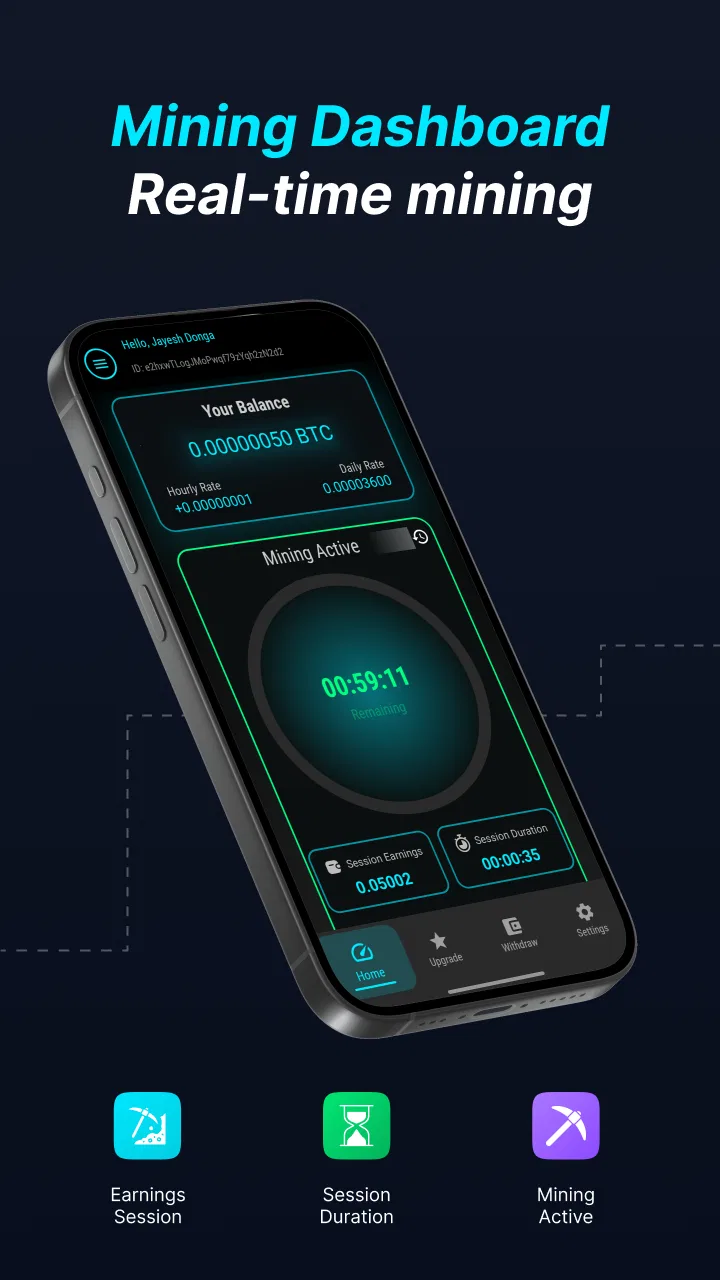
BitCloud: MineServer is a finance app from SR INFOSOFT LTD that focuses on cloud-based BitCloud mining from a mobile device. I approached it less like a traditional banking tool and more like a lightweight way to follow a mining service without setting up hardware at home. That distinction matters: the app’s main appeal is convenience, while the main question is whether convenience gives you enough control and clarity for your own risk tolerance.
The app is free to install and is rated for Everyone, which makes the first step easy for a broad audience. It has reached over 50 thousand installs and holds a 3.9 average from 391 ratings, so there is some visible user interest without the level of popularity that would make me treat it as automatically established. My overall view is cautious but practical: it may suit someone who wants to explore mobile cloud mining in a simple format, but it should not be treated like a guaranteed income tool or a replacement for a regulated finance app.
What the cloud-mining capability really changes
The central capability is the ability to start BitCloud mining through a remote service rather than running mining equipment directly on your phone. In everyday terms, that means the phone acts as the access point and control screen, while the concept of mining is presented as a cloud activity. This is much more approachable than buying components, configuring a machine, managing heat and noise, or leaving a computer running continuously.
You May Also Like

 Blood Strike: 2.5 Anniversary
Blood Strike’s Loadouts Turn Every Drop Into a Tactical Gamble
A close look at Blood Strike’s custom loadouts: how fast access to signature weapons reshapes its battle royale rhythm, rewards preparation, and narrows the gap between fights.

 Pandora - Music & Podcasts
Pandora’s Music Is Easy to Start, but Harder to Recover
Pandora’s strength is its low-effort path from a seed to a station. Its weak spot is how much confidence it asks you to place in connection, setup, and quiet recovery.

 8 Ball Pool
 Is Built on Rivalries, Rematches, and Routine
A close look at the rivalries, rematches, shared routines, and unanswered safety questions that turn a quick pool match into a persistent mobile community.

 Samsung Music
’s Quiet Strength Is Playing What You Already Own
Its reach comes less from spectacle than from dependable access to a personal library. That simplicity is both the app’s strongest retention engine and its ceiling.

 AccuWeather: Weather Radar
AccuWeather Review: A Quick, Clear Forecast for Everyday Decisions
For everyday plans, the best forecast is the one you can understand quickly. AccuWeather makes rain timing, radar, and local conditions easy to act on, with a few trade-offs.

 Hill Climb Racing
Why Hill Climb Racing Still Turns Crashes Into One More Run
A tiny car, a bumpy hill and one more upgrade: Hill Climb Racing keeps resurfacing because its simple chaos makes every near-miss feel personal.
More From Our News Desk
View All News


That convenience is also the app’s defining limitation. A cloud-mining app does not give me the same hands-on visibility as operating hardware that I own. I am relying on the service behind the application to represent activity accurately and to make the experience understandable. For that reason, I would judge the app not only by how quickly I can begin, but by how clearly it communicates status, account activity, costs and any conditions attached to participation.
For a newcomer, this is a useful distinction to understand before spending anything. The word “mining” can sound like a direct technical process taking place on the handset, but the practical experience is closer to managing access to a remote mining arrangement. The phone’s advantage is portability, not raw computing power. I can check the service during a commute or from home without carrying a laptop, but I am not gaining the ownership and control associated with personal mining hardware.
The strongest reason to try it is simplicity, not certainty of returns. That single idea keeps expectations realistic. If I wanted to learn the basic shape of a mobile mining service, the app gives me a more approachable starting point than a full hardware setup. If I wanted predictable earnings, transparent investment reporting or conventional money-management tools, I would look elsewhere.
Starting without turning the phone into a mining machine
In practice, the mobile format removes several barriers that often discourage beginners. There is no need to find a suitable room for equipment, think about ventilation, or keep a desktop computer active. The app’s purpose is to make the service mobile-friendly, so the phone becomes the place where I access the mining experience rather than the machine expected to perform intensive work.
That can be useful for people who want occasional involvement. I can open the app, review what is happening and then leave it alone instead of constantly managing a physical setup. This is a better fit for a casual experiment than for someone who wants to optimize every technical variable. The trade-off is that casual access can make it easy to overlook the details that matter most, especially fees, withdrawal conditions, account requirements or the difference between displayed progress and money that can actually be used.
I would therefore begin with observation rather than payment. The free entry point lets a curious user understand the interface and decide whether the information is clear enough to justify deeper involvement. I would note how the app presents the mining status, what actions are available, and whether the language is understandable without specialist knowledge. If an app in this category makes the user feel rushed into purchasing an upgrade, that would be a warning sign for me, even if the interface itself looks polished.
The current version is 1.9, and the minimum operating-system requirement is Android 7.0. That gives the app a reasonably broad Android reach, including devices that are not recent. Still, compatibility is not the same as comfort. On an older phone, I would pay attention to responsiveness, battery behavior and how easily the app remains usable alongside ordinary tasks. A finance-related app should not force me to sacrifice basic phone reliability just to keep a mining screen open.
A realistic day-to-day use case
Imagine someone who has heard about cloud mining but does not want to build a computer for it. They install the app before work, look through the available mining area and start with the free path rather than buying anything. During lunch, they check whether the account information is easy to interpret. In the evening, they review the same screen and decide whether the experience feels transparent enough to continue.
That is the scenario where I see the most sensible value. The app can serve as a low-friction learning tool for someone who wants to understand how a mobile mining service feels in use. It is less convincing as a background financial plan. Checking a balance or mining status is not the same as receiving a dependable return, and I would never use rent, bill money or emergency savings for an experiment of this kind.
A second useful workflow is setting a personal review point before starting. I would decide in advance how much time I am willing to spend learning the service and what evidence would make me stop. For example, I would look for clear account progress, understandable purchase information and a straightforward path for handling any resulting balance. This prevents the common mistake of continuing simply because I have already invested attention.
Where the free model helps, and where it becomes complicated
The free price is a genuine advantage for initial exploration. I can test whether the app’s layout makes sense and whether cloud mining is even interesting to me before committing money. That is especially valuable in a category where the underlying idea can sound more impressive than the everyday experience.
However, the presence of in-app purchases changes the decision once I move beyond basic use. Purchases range from $4.49 to $649.99 per item, a very wide spread that deserves careful attention. I would not view the highest-priced option as a natural next step simply because it is available. A larger purchase increases exposure to the service, but it does not automatically make the outcome safer, clearer or more worthwhile.
My practical advice is to treat every paid option as a separate financial decision. Read the wording around the purchase, identify what it is supposed to provide, and consider whether the benefit can be evaluated without relying on optimistic assumptions. I would also keep a written record of what I paid and what the app showed afterward. That small habit makes it easier to distinguish genuine progress from a feeling that the account is merely becoming more active.
Another non-obvious trade-off is attention. Cloud mining is marketed through the idea of passive activity, but a responsible user still needs to monitor the account enough to understand changes. If I stop checking completely, I may miss important information about account status or purchasing choices. If I check constantly, I can turn a simple experiment into an emotional reaction to every displayed change. A scheduled review is healthier than compulsive refreshing.
How it compares with familiar finance alternatives
BitCloud: MineServer occupies a very different space from a budgeting app, a savings account or a conventional investment platform. Those alternatives generally focus on organizing money, holding funds, tracking spending or presenting established financial products. This app is centered on a cloud-mining experience, so it is relevant only if that specific idea interests me.
It also differs from direct cryptocurrency exchanges. An exchange is usually built around buying, selling or transferring digital assets, while a mining service presents participation in the production side of a digital currency system. Someone who already knows exactly which asset they want to trade may find an exchange more direct. Someone who wants a simple introduction to remote mining may find this app easier to approach, provided they understand that ease of access does not remove financial risk.
Compared with personal mining hardware, the app wins on space, noise and setup effort. Hardware offers more direct control but brings technical maintenance, electricity considerations and the possibility of equipment becoming outdated. The cloud route removes much of that work, but it also means trusting the remote arrangement and accepting less physical control. Neither option is automatically better; the right choice depends on whether I value convenience or technical ownership more.
For ordinary personal finance, I would choose a budgeting or savings tool instead. This app is not where I would track household bills, plan a monthly budget or build an emergency fund. Its usefulness begins only after those basic priorities are covered and I am consciously exploring a speculative technology-related service.
Limitations I would take seriously
The first limitation is the gap between a simple interface and a complicated financial decision. A clean mobile screen can make cloud mining feel straightforward, but the real evaluation still depends on conditions, costs and the practical usability of any resulting balance. I would not assume that an attractive or easy-to-navigate app has solved those questions for me.
The second is the risk of confusing activity with profit. Seeing mining progress, account movement or a growing figure can create a sense that the service is working financially. I would separate those observations from the question that actually matters: what can I ultimately use, under what conditions, and after which costs? Without that separation, it is easy to overestimate the value of participation.
The rating of 3.9 is another reason I would approach it with an open but critical mind. It suggests a mixed experience rather than universal approval. I would read user feedback for recurring patterns before making a paid commitment, paying particular attention to comments about clarity, account handling and expectations. Reviews are not a substitute for testing, but they can help me identify which parts of the experience deserve extra scrutiny.
The app is also not the right choice for anyone who needs guaranteed access to money or a familiar financial safety net. I would skip it if I were looking for a regulated savings product, dependable income, professional investment guidance or a tool for managing daily finances. I would also avoid it if I disliked services where important outcomes depend on a remote provider rather than equipment and records under my direct control.
Who gets the most from it
The best audience is a curious Android user who wants to examine cloud mining from a phone, prefers a low-effort setup and is willing to start cautiously. The free entry makes it possible to learn the basic workflow before considering any purchase. That is a reasonable use case, especially for someone who treats the app as an educational trial rather than a financial shortcut.
It can also suit an experienced cryptocurrency user who wants a mobile way to check a mining-related account instead of maintaining hardware. Even then, I would expect that person to compare the service’s practical terms with alternatives and to keep the amount committed small enough that a disappointing result would not affect essential finances.
Beginners should take one extra step: write down what they believe the app does before spending money, then compare that assumption with the actual screens and purchase descriptions. This catches a common misunderstanding between phone-based access and phone-based mining. It also encourages a more useful question than “How much can I make?”—namely, “What exactly am I paying for, and how will I judge whether it was worthwhile?”
Because the app is free and suitable for Everyone, it is approachable, but age suitability should not be confused with financial suitability. Younger or inexperienced users still need adult guidance around purchases and digital-asset risk. The broad content rating describes accessibility, not a promise that the service is appropriate for every financial situation.
My final view after using the concept in practice
I see BitCloud: MineServer as a convenient doorway into cloud mining, not as a complete finance solution. Its mobile approach removes the intimidating hardware setup and makes occasional checking easy. That is a real benefit, and it explains why the app can appeal to people who would never build a mining computer.
At the same time, the app asks me to be disciplined. I would begin free, avoid treating displayed activity as guaranteed profit, review every purchase carefully and compare the experience with more familiar financial tools. The wide range of optional spending makes restraint particularly important.
My recommendation is therefore conditional: try it if your goal is to explore mobile cloud mining and you can treat the experience as speculative. Skip it if you need predictable returns, direct technical control or everyday money management. Used with modest expectations, the app can make an unfamiliar idea easier to investigate. Used as a promise of passive income, it is the wrong tool and the wrong expectation.
FAQs for BitCloud: MineServer
01What is BitCloud: MineServer, and what can I do with it?
BitCloud: MineServer is a mobile-focused tool for creating and managing a Minecraft server from an Android device. It is designed to let you configure server settings, start or stop the server, and manage basic hosting tasks without using a traditional computer. Before downloading, remember that the exact features may depend on your Minecraft edition, device performance, Android version, and the server software supported by the app.
02Can BitCloud: MineServer host a Minecraft server for friends?
The app is intended to help users run a Minecraft server that other players can join, but multiplayer access is not always automatic. You may need to configure ports, network permissions, server visibility, and firewall or router settings. Players must also use a compatible Minecraft version and edition. If you are hosting over mobile data or a restricted network, connection reliability and accessibility may be limited.
03Does BitCloud: MineServer work with Minecraft Bedrock or Java Edition?
Compatibility is one of the most important details to check before installation. Minecraft Java Edition and Bedrock Edition use different server systems, file formats, and connection methods, so an app designed for one may not support the other in the same way. Review the current store listing and the app’s documentation to confirm which edition, server software, versions, plugins, or mods are supported on your device.
04Will BitCloud: MineServer work on every Android phone?
The application may run on many modern Android devices, but hosting a server requires more resources than simply playing Minecraft. Performance can vary according to RAM, processor speed, available storage, Android version, and the number of connected players. Older or entry-level phones may experience lag, crashes, overheating, or background restrictions. Keeping sufficient free storage and allowing the necessary permissions can improve stability.
05Is BitCloud: MineServer free, and are there any additional costs?
You should check the current Google Play listing for the exact pricing model because availability, advertisements, subscriptions, or optional purchases can change over time. Even if the app itself is free, running a server may use considerable mobile data, battery, and storage. You could also incur costs for internet access or external hosting services if your device or network cannot provide a stable public connection.
Pros
- Simple interface makes server management easy for beginners.
- Cloud-based access lets you manage servers from different devices.
- Server status and resource details are available at a glance.
- Useful for testing Minecraft server ideas before wider release.
- Supports remote management without keeping the app open constantly.
Cons
- Some advanced controls may require technical server knowledge.
- Performance depends heavily on your internet connection.
- Cloud hosting costs can increase with higher resource usage.
- Limited customization compared with self-hosted server panels.
- Server setup may take time if you are unfamiliar with hosting settings.

BitCloud: MineServer
Gallery